


AI Photo Generator-Enhance Pic
3.629.00 Reviews
App Specs
- Version
- 1.3.6
- Updated On
- License
- Free
- Downloads
- 1,000,000+
- Developer
- Dijital Elma
- Categories
- Photography
- Platform
- Android
Screenshots
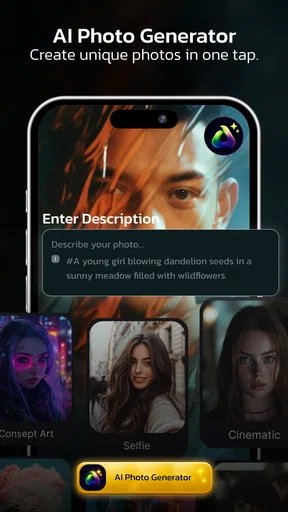
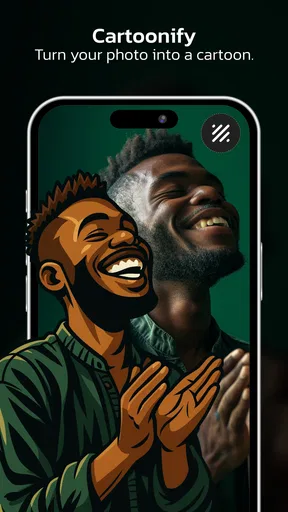
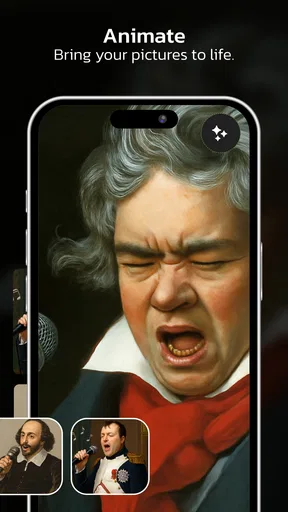
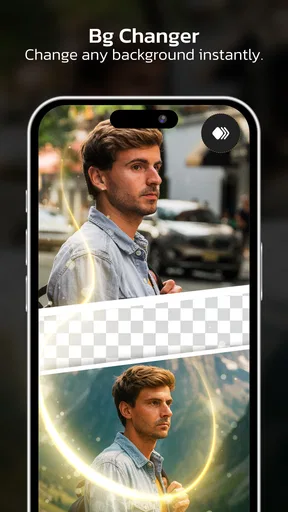
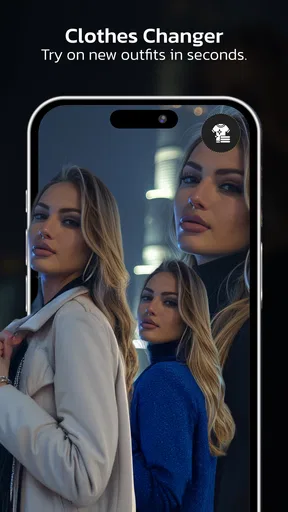
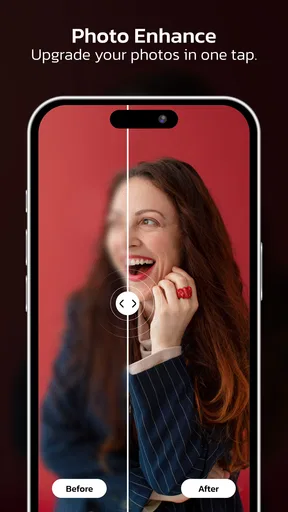
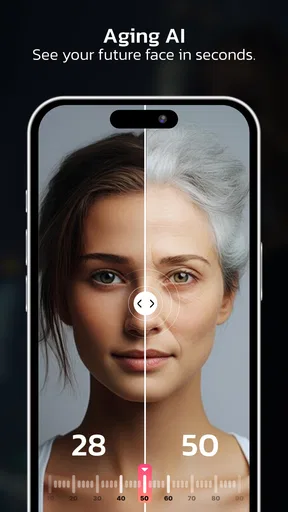
 Analysis by AppCompare
I judge photo apps less by the size of their tool list than by whether they help me turn a specific idea into an image I’m happy to share. AI Photo Generator-Enhance Pic is aimed at that creative middle ground: making portraits, experimenting with face swaps, and applying AI-assisted changes without needing a full desktop editor. It’s a free photography app from Dijital Elma, and its central appeal is quick visual experimentation rather than meticulous, layer-by-layer retouching.
A useful fit for quick creative tasks
I can see this app earning a place on a phone for someone who occasionally needs a more unusual portrait but doesn’t want to learn a complicated editing workflow. Think of a creator preparing a casual profile update, a friend making a playful image for a birthday message, or a small business owner testing an informal visual idea before deciding whether to make something more polished elsewhere. The value is in getting a quick creative direction to react to, not in replacing a full production setup.
That distinction also helps answer whether it is suitable for publishing. I’d be comfortable considering an AI-made portrait for a casual social post after checking it carefully, but I wouldn’t automatically use it for a company bio, an author photo, or a portfolio image where recognizability and consistency matter. When an edited face might be mistaken for a real photograph, I’d make the creative treatment clear rather than letting the image imply something it doesn’t.
Start with a clear image idea
When I open AI Photo Generator-Enhance Pic, I think of it as a tool for answering a practical question: can I make this portrait more distinctive, or create a playful variation worth sending to someone? That focus makes it easier to approach than a general image editor with dozens of unrelated controls. It is designed around portraits and AI-driven changes, so it is most compelling when a face is the main subject.
A useful starting point is to decide what the picture needs before trying effects. Is the goal a polished profile image, a more imaginative portrait, or a face-swap joke for a private chat? Keeping one purpose in mind helps me judge each result against the original idea instead of getting pulled into endless edits. AI tools can produce surprising variations, but surprise alone does not make an image suitable for a work profile or public post.
The app’s short description calls it an AI photo generator, while its broader photography focus includes portrait creation and face swapping. That combination makes it different from a conventional camera app, which is mainly about capturing a moment, and from a standard editor, where the user usually adjusts color, crop, and exposure directly. Here, the creative choice is more about what kind of transformed image I want to explore.
That makes it a natural fit for casual creators who want to test an idea without learning advanced editing software. I can imagine using it to make a themed portrait for a group chat, try a more expressive look for a social post, or see whether a familiar selfie can be turned into something with a different mood. If my priority is faithful, subtle correction rather than an AI-generated change, a traditional editor is likely the better first stop.
Worth Reading Before You Choose

Switching to Android Auto Means Rethinking Your Driving Routine

Google Calendar Makes a Crowded Week Easier to Manage

Baby Panda World Brings Quick Play to Modern Phones, but Its Game Library Feels Busy

ESPN’s Live Game View Makes Following Close Games Easier

QuizzLand Review: A Good Fit for Short Trivia Breaks, Not Every Player

Basketball Stars: Multiplayer Is Fast, but Can It Recover When Matches Go Wrong?
Choose the source photo with care
For portrait-focused AI work, the source image shapes the whole experience. I would begin with a well-lit photo where the face is easy to see and not hidden by hair, glasses glare, or a strong shadow. That is not a promise that every effect will behave perfectly; it is a sensible way to give the app a clearer starting point and reduce the chance that a result feels distracting or oddly composed.
A small but useful workflow choice is to keep an untouched copy of the original before experimenting. That gives me a clean comparison point and makes it easier to decide whether an AI variation genuinely improves the image. It also prevents a common creative trap: accepting a dramatic result simply because it looks different, rather than because it serves the intended audience.
Make changes with a purpose
The app is best approached as a place to explore possible looks, not as a substitute for deliberate portrait direction. I would try one type of transformation at a time, then pause to check the face, expression, and overall likeness. If I change several aspects in quick succession, it becomes harder to tell which choice produced the improvement—or which one made the picture feel less like the person in it.
Face swapping is especially dependent on context. It can be entertaining for a lighthearted image shared with friends, but it may be a poor choice for a professional headshot, a family keepsake meant to look authentic, or anything that could mislead someone about who appears in the image. I treat altered portraits as creative edits and make that clear when the context could otherwise cause confusion.
For an everyday example, imagine I want a more playful image for a birthday message. I would start with a clear portrait, try a single creative direction, and compare the result with the original before sending it. If the face looks unnatural or the change overwhelms the person’s expression, I would rather return to the source image than keep polishing an idea that is not working. That kind of stop-and-check habit matters more than generating a large pile of alternatives.
Another practical tip is to separate “make it interesting” from “make it usable.” An image can be fun to explore but still feel too artificial for a profile photo or public-facing creator page. I would reserve the most obvious transformations for playful, clearly creative contexts and choose a more restrained result when the image needs to represent me accurately.
Iteration without losing the original idea
AI editing can encourage repeated attempts because each result suggests another possibility. I find it helpful to set a simple limit: choose the strongest version from a small set of meaningful experiments, rather than chasing a theoretically perfect image. The point is not to stop exploring; it is to avoid spending time on variations that do not move the image closer to its intended use.
Look closely at the details that matter for a portrait: whether the face still feels recognizable, whether the expression reads naturally, and whether the change fits the image’s mood. A result that looks compelling at a glance may be less convincing when viewed as a small profile picture or in a message thread. Checking the image at the size and in the setting where it will actually appear is a simple way to make a better final choice.
The trade-off is that AI transformations can be less predictable than direct manual adjustments. In a conventional editor, a crop or brightness change is easy to understand and control. With an AI-led result, the creative output may be more novel, but the user may have less precise influence over every detail. That is the main reason I would not choose this app for careful skin retouching, exact brand imagery, or a project where every visual element must remain consistent.
It is also worth being realistic about what “enhance” means in a creative app. I would not assume that every transformation will preserve the original photo exactly or that every generated portrait will suit every purpose. If I need dependable color correction, detailed object cleanup, or precise control over a final composition, I would use a dedicated editor built around those tasks and treat this app as a complementary source of ideas.
From experiment to something shareable
Once I have a result I like, the next question is whether it is ready to leave the editing session. I would check the image at full attention rather than relying on a quick thumbnail impression, then decide whether it suits the destination: a private message, a social post, or a more formal profile. This is particularly important for swapped or heavily transformed faces, where a short note that the image is edited can prevent an awkward misunderstanding.
I would also keep the original alongside the finished version if the picture has personal value. That gives me the option to make a different edit later and avoids treating an AI variation as the only copy of a meaningful photograph. For casual creative work, this simple handoff habit is more useful than trying to make every first attempt final.
Practical choices before committing
For a one-off task, I’d treat the app as a place to explore first and decide about spending only after I know which tools I actually want to keep using. It is free to install, with in-app purchases ranging from $1.49 to $29.99 per item. That spread makes it sensible to check the purchase details in context rather than assuming that every useful result requires payment—or that a paid option will solve a mismatch between the app’s creative style and my needs.
A natural question is whether it can stand in for a regular photo editor. For quick portrait experiments, it may be the more interesting option; for routine corrections such as adjusting a crop or refining color, a manual editor gives me a more direct and predictable process. I’d use them as complementary tools if a project calls for both: explore a transformed portrait here, then take a more controlled approach elsewhere if the final image needs careful finishing.
Another question is what makes a good first attempt. I’d pick a single, clearly lit portrait and define the intended destination before making changes. That gives me a fair way to judge the output and helps avoid using a dramatic transformation where a subtle correction would do. If the first image is hard to read or the result looks out of place, switching to a better source photo is often a more useful next step than repeatedly pushing the same idea.
The app is rated for Everyone, and it has an average rating of 3.6 from around 755 ratings, with 29 written reviews. Those figures suggest a mixed response rather than universal approval. I would take that as a reason to approach it with practical expectations: it may suit someone who enjoys AI portrait experiments, while users expecting precise, consistently polished editing may prefer a more manual tool.
It has passed 1 million installs and was released on November 27, 2024. The current version is 1.3.6, and it requires Android 7.0 or later. Those details make it easier to judge whether it fits an Android device and whether its audience is broad, but they do not change the most important question for a creator: does its style of AI editing match the work I want to make?
Who should choose it—and who should not
I would recommend AI Photo Generator-Enhance Pic to someone who wants an accessible way to play with portrait ideas, make a casual image more distinctive, or try a face swap without turning the task into a full editing project. It is especially appealing when experimentation is part of the fun and the final image does not need to meet strict professional standards.
I would skip it if I needed precise retouching, consistent results for a series of branded portraits, or reliable control over every adjustment. A conventional photo editor is better for careful exposure, cropping, and color work; a more advanced creative suite makes more sense when a project requires detailed compositing. The choice is less about which app is universally best and more about whether I want AI-led variation or hands-on control.
My verdict is that this is a focused creative tool, not an all-purpose photo studio. Its strongest use is turning a clear portrait idea into something playful or visually different, then helping me decide whether that variation is worth keeping. If I start with a suitable photo, make one change at a time, and judge the result by where I plan to share it, I can get more out of the experience—and avoid expecting it to replace a dedicated editor.
Pros
- Simple controls make it easy to create or enhance images without much editing experience.
- Useful for refreshing older or lower-quality photos.
- AI styles offer quick ways to explore different looks for an image.
- Can save time compared with making similar edits manually.
- Handy for creating polished images to share on social media.
Cons
- Results can look artificial
- especially on faces and fine details.
- Enhancement may change features rather than faithfully preserve the original.
- Image quality and available tools may depend on an internet connection.
- Some features or exports may require a paid plan or in-app purchase.
- Uploading personal photos may raise privacy concerns; check the app's data policy.
FAQs for AI Photo Generator-Enhance Pic
What is AI Photo Generator-Enhance Pic, and what can it do?
AI Photo Generator-Enhance Pic is a photo-editing app built around artificial-intelligence tools. Depending on the version available on your device, its features may include enhancing image clarity, changing or generating visual styles, and applying edits with less manual work than a traditional editor. Check the app’s current feature list and screenshots before downloading, since tools and results can vary by app version, device, and subscription.
Is AI Photo Generator-Enhance Pic free to download and use?
The app may be free to download while placing some features, editing credits, or continued use behind in-app purchases or a subscription. Review the store listing for current pricing, trial terms, and renewal details before starting a purchase. Also check whether the free version adds limits or watermarks, and cancel any trial through your Apple or Google account settings before its renewal date if you do not wish to continue.
Do I need an internet connection to generate or enhance photos?
Some basic editing functions may work on your device, but AI generation and enhancement often rely on online processing. As a result, you may need a stable internet connection to upload an image, submit an edit, or download the finished result. Processing speed can depend on your connection and the service’s availability. Check the app’s permissions and description to learn which features are available offline and whether mobile data may be used.
Are photos uploaded to AI Photo Generator-Enhance Pic private and secure?
Before editing personal or sensitive images, read the app’s privacy policy and the data disclosures on its Google Play or Apple App Store page. Find out whether photos are uploaded to external servers, how long they may be retained, and whether they are used to improve AI systems. Avoid uploading images you would not want processed online, and review requested permissions so the app only accesses what you need.
What should I know about the quality and limitations of AI-generated edits?
AI edits can improve an image or create an appealing new look, but results are not guaranteed to match your expectations. Fine details, faces, text, and backgrounds may sometimes appear altered or inconsistent, especially in low-resolution or poorly lit photos. Try a copy of the original image first, compare the result before saving, and check whether the app exports at full resolution or restricts image quality to certain plans.


